
iPhone & iPad app — Photo & Video
Phone Swipe Media The photo cleaner you swipe.
Review your photos and videos one swipe at a time. Keep what matters, set items aside, and check your delete queue before making any changes to Photos.
- Price
- Free · 50 reviews a day
- Works on
- iPhone & iPad · iOS 16.4+
- Privacy
- Your library stays on your device
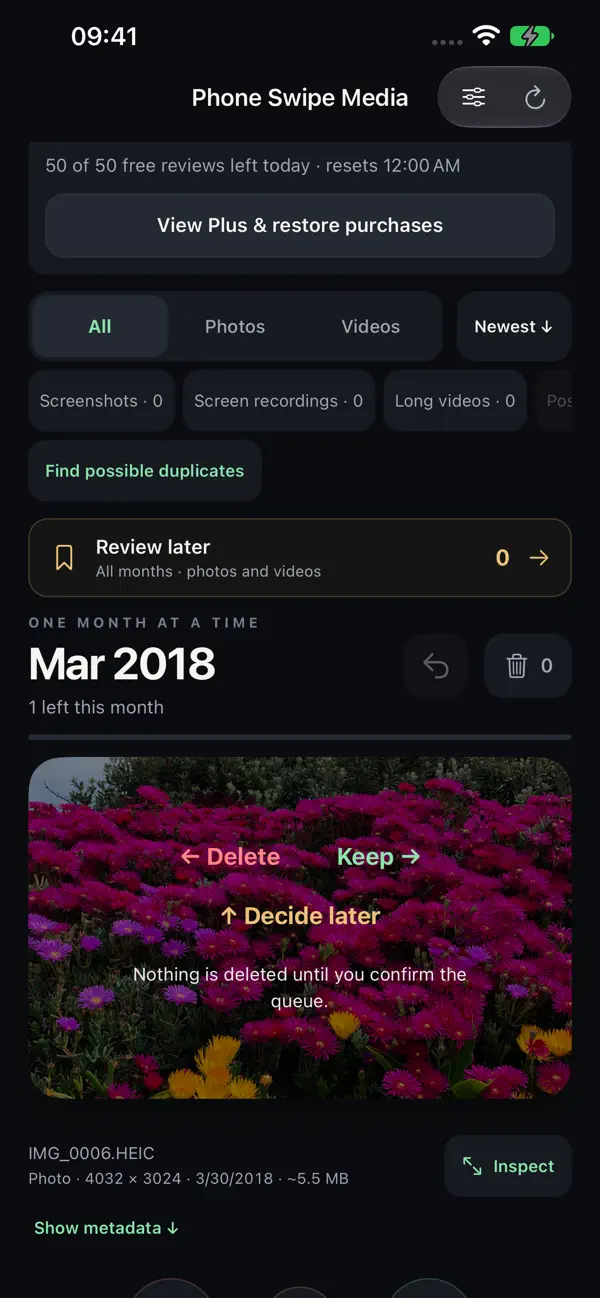
Swipe left, right, or up to sort each photo. 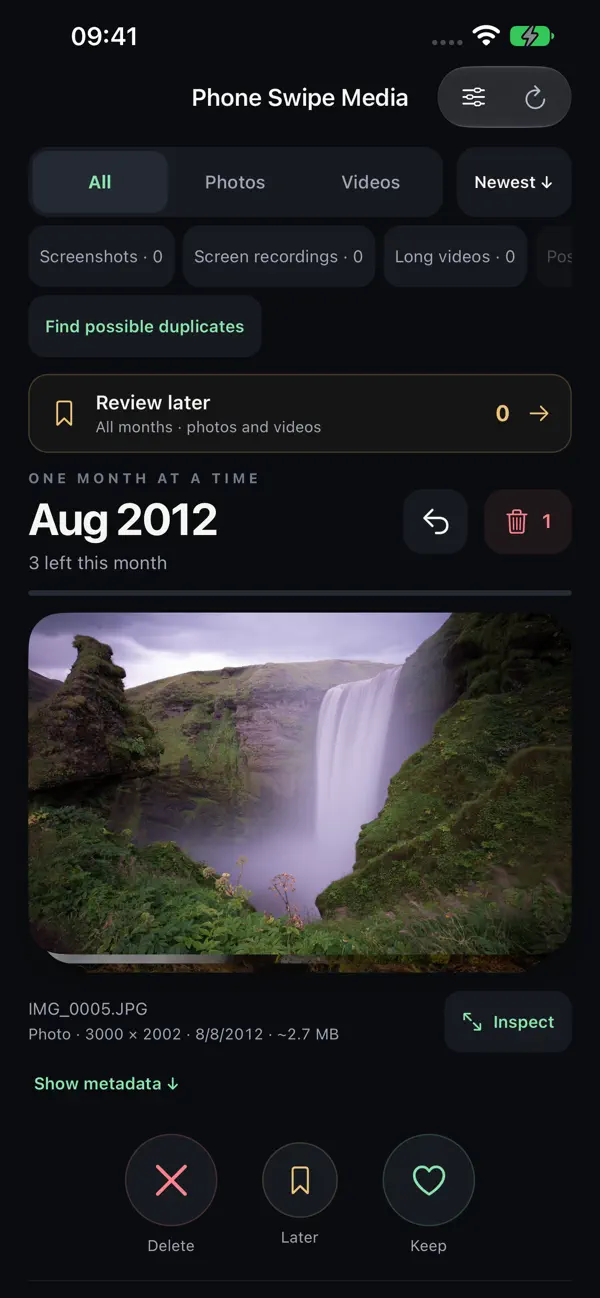
Work through your library one month at a time. 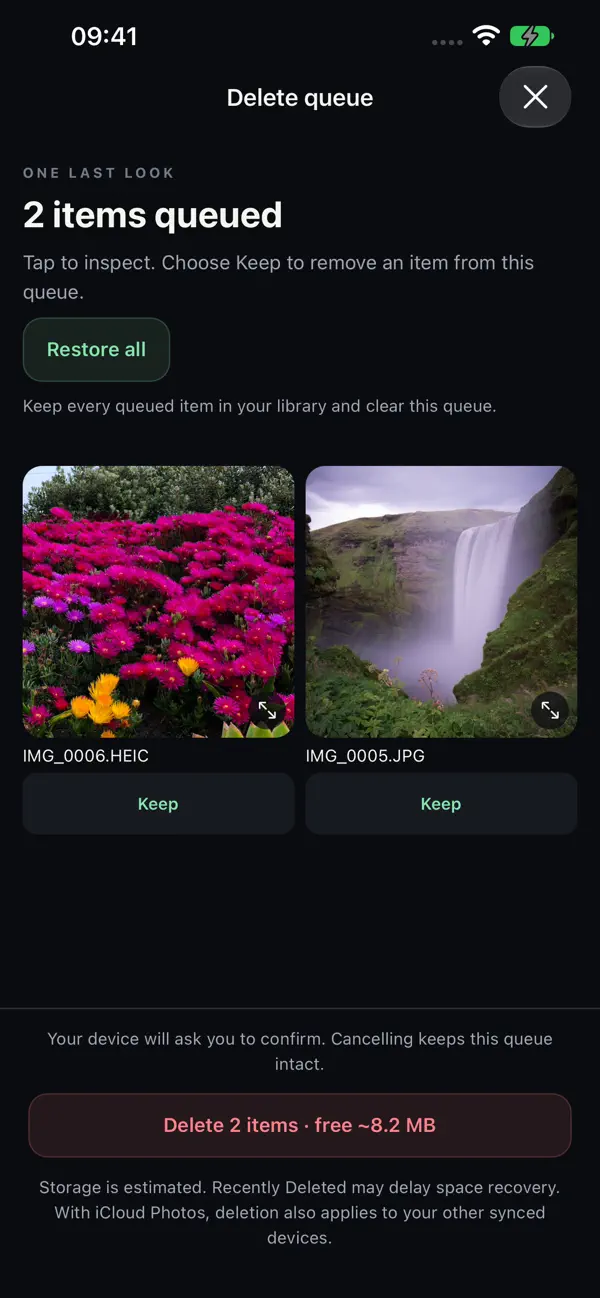
Check the delete queue before anything is removed.
How it works
Clean up your camera roll, one swipe at a time.
Phone Swipe Media turns a crowded photo library into a short run of simple decisions. Every photo and video gets one of three answers, and nothing is deleted until you confirm.
Swipe right
Keep it
The photo or video stays in your library and the next one appears.
Swipe left
Queue it for deletion
Nothing is removed yet. The item waits in a delete queue you can inspect, rescue from, or restore in full.
Swipe up
Decide later
Set an item aside and come back to it when you are ready.
Confirm
Delete only when you say so
Review the queue, then confirm. Your device asks you once more before anything leaves Photos.
Features
Everything you need to declutter photos and free up iPhone storage.
Photos, videos, and screenshots
Review photos, videos, screenshots, screen recordings, and long videos, with filters for each.
One month at a time
Work through your photo library month by month, at your own pace, and see when a month is done.
Inspect before you decide
Open any item full screen, play videos, and read the available metadata such as size and date.
Undo and rescue
Undo a choice, rescue single items from the delete queue, or restore the whole queue before confirming.
Find possible duplicates
Find possible similar media on your device and inspect each suggestion yourself. Matches are suggestions, not a guarantee of identical files.
Pick up where you left off
Review progress is saved on your device, so a large camera roll can be cleaned up over many short sessions.
Made for iPad too
iPad layouts and keyboard shortcuts make a big clean-up comfortable on a larger screen.
Pricing
Free to use. Plus if you want more.
Free
50 new media reviews every day
Undo, reviewing or restoring queued items, and confirming deletion are always free. The sample library never uses your daily allowance.
Plus Monthly
$2.99 a month in the US
Unlimited reviews while subscribed. Renews automatically each month unless cancelled in your Apple Account settings at least 24 hours before the period ends.
Plus Lifetime
$24.99 once in the US
A one-time purchase for permanent access to unlimited reviews. No recurring charge.
US prices at launch. Apple shows the current price in your local currency before you confirm, and processes every purchase.
Privacy
Your photos stay on your device.
- The app does not upload your photo library or its metadata to our servers.
- Similar-media suggestions are computed on your device.
- There is no sign-in, no advertising, and no third-party behavioral analytics.
- You can try the sample library without granting Photos access at all.
Read the full Phone Swipe Media privacy policy.
Questions
Phone Swipe Media FAQ
- Is Phone Swipe Media free?
- Yes. The app is free to download and includes 50 new media reviews every day. Undo, reviewing the delete queue, rescuing items, and confirming deletion are always free. Optional Plus removes the daily limit with a monthly subscription or a one-time lifetime purchase.
- Does swiping left delete my photo right away?
- No. A left swipe only queues the item. Open the delete queue to inspect each item, choose Keep to rescue it, or Restore all to empty the queue. Only the final delete action asks your device to confirm.
- Can I get a photo back after deleting it?
- Before you confirm, you can rescue any item or restore the whole queue. After you confirm, check Photos → Recently Deleted. The app cannot recover media that has been permanently removed from Photos.
- Does the app upload my photos?
- No. The app does not upload your library or its metadata to our servers, and your review choices are saved on your device. There is no account to create.
- Does it work with iCloud Photos?
- Yes. Your device may download previews or originals from iCloud Photos when you view them. A confirmed deletion also applies to your other synced devices, and Recently Deleted can delay when storage is recovered.
- How much iPhone storage will I free up?
- The delete queue shows an estimate of the space your queued items use. Estimates are approximate, and Recently Deleted can delay when that space is recovered.
- Does it work on iPad?
- Yes. Phone Swipe Media is a universal app for iPhone and iPad, with iPad layouts and keyboard shortcuts. It requires iOS or iPadOS 16.4 or later.
Keep memories. Clear clutter.
Phone Swipe Media is free on the App Store for iPhone and iPad. Requires iOS 16.4 or later.
Phone Swipe Media is published by Mister Business Enterprises. Apple, iPhone, iPad, iCloud, and App Store are trademarks of Apple Inc., registered in the U.S. and other countries and regions.